

Embark on your journey with the Beginner's Guide to Predictive Analytics with Data Robot. This comprehensive guide will walk you through the fundamentals of predictive analytics and how Data Robot can revolutionize your data-driven decision-making process.
Overview of Predictive Analytics
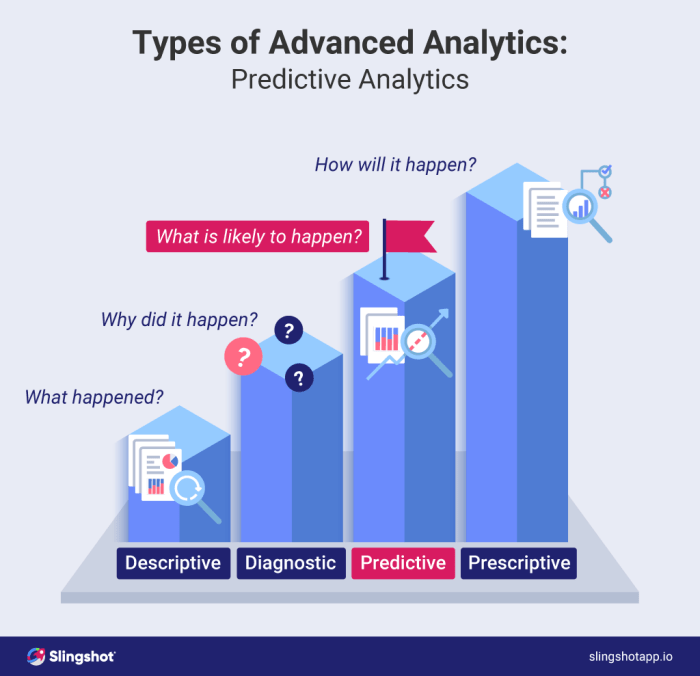
Predictive analytics is the process of using data, statistical algorithms, and machine learning techniques to identify the likelihood of future outcomes based on historical data. It involves analyzing current and historical data to make predictions about the future.Predictive analytics plays a crucial role in data-driven decision-making by providing insights that can help organizations make informed decisions, optimize processes, and identify potential risks and opportunities.
By leveraging predictive analytics, businesses can anticipate trends, forecast outcomes, and improve their overall performance.
Real-World Applications of Predictive Analytics
- Finance: Predictive analytics is widely used in financial institutions for credit scoring, fraud detection, and risk assessment. By analyzing customer data, banks can predict creditworthiness and potential risks.
- Retail: Retailers use predictive analytics to forecast consumer behavior, optimize pricing strategies, and manage inventory effectively. By analyzing sales data, retailers can identify trends and personalize marketing campaigns.
- Healthcare: In healthcare, predictive analytics is used for patient diagnosis, treatment recommendations, and hospital resource management. By analyzing patient data, healthcare providers can predict disease outbreaks and improve patient outcomes.
- Marketing: Marketers utilize predictive analytics to segment customers, personalize messaging, and forecast campaign performance. By analyzing customer data, marketers can target the right audience and optimize marketing strategies.
Introduction to Data Robot
Data Robot is a powerful predictive analytics software that leverages automated machine learning to help organizations extract valuable insights from their data. It streamlines the process of building and deploying predictive models, allowing users to make data-driven decisions with ease.
Key Features and Capabilities
- Automated Machine Learning: Data Robot automates the entire machine learning process, from data preparation to model deployment, making it accessible to users with varying levels of technical expertise.
- Model Interpretability: The platform provides explanations for model predictions, allowing users to understand the factors influencing the outcomes and build trust in the results.
- Scalability: Data Robot can handle large datasets and complex modeling tasks, enabling organizations to analyze massive amounts of data efficiently.
- Integration: The software seamlessly integrates with existing data sources and tools, making it easy to incorporate predictive analytics into existing workflows.
Comparison with Other Predictive Analytics Tools
Data Robot stands out in the market for its user-friendly interface, automated machine learning capabilities, and robust model interpretability features. While other predictive analytics tools may require more manual intervention and technical expertise, Data Robot simplifies the process and accelerates the time to insights.
Additionally, its scalability and integration capabilities make it a versatile choice for organizations looking to harness the power of predictive analytics.
Getting Started with Data Robot
To begin using Data Robot for predictive analytics, you need to set up the platform, import data, and prepare it for analysis. Follow the step-by-step guide below to get started.
Setting Up Data Robot
- Sign up for a Data Robot account on their website.
- Download and install the Data Robot software on your computer.
- Launch Data Robot and log in with your account credentials.
- Follow the on-screen instructions to complete the setup process.
Importing Data into Data Robot
To import data into Data Robot for analysis, follow these steps:
- In Data Robot's interface, navigate to the "Datasets" tab.
- Click on the "Upload Dataset" button.
- Select the file you want to import from your computer and upload it to Data Robot.
- Data Robot will automatically detect the format of the file and import it into the platform.
Preparing Data for Analysis
Once your data is imported into Data Robot, you can prepare it for analysis using the platform's interface:
- Cleanse the data by handling missing values, outliers, and errors.
- Explore the data to understand its structure and relationships between variables.
- Transform the data by creating new features or applying transformations.
- Split the data into training and testing sets for model building and evaluation.
Building Predictive Models
Building predictive models in Data Robot involves exploring different types of models, training and evaluating them, and implementing best practices to ensure accuracy and reliability.
Types of Predictive Models in Data Robot
- Regression Models: Used to predict a continuous numerical value.
- Classification Models: Used to predict categories or labels.
- Time Series Models: Used to predict future values based on historical data.
Training and Evaluating Predictive Models
- Data Preparation: Clean and preprocess data before training the model.
- Model Training: Use algorithms to train the model on historical data.
- Model Evaluation: Assess the model's performance using metrics like accuracy, precision, and recall.
- Model Optimization: Fine-tune the model parameters to improve performance.
Tips for Building Accurate Predictive Models
- Feature Selection: Choose relevant features that have a significant impact on the prediction.
- Hyperparameter Tuning: Adjust the model's hyperparameters to optimize performance.
- Cross-Validation: Validate the model using different subsets of data to ensure generalizability.
- Ensemble Methods: Combine multiple models to improve predictive accuracy.
- Continuous Monitoring: Regularly monitor and update the model to maintain accuracy over time.
Interpreting and Visualizing Results
When it comes to predictive analytics models generated by Data Robot, interpreting and visualizing the results is crucial for understanding the insights provided by the data. By effectively communicating these results to stakeholders, you can drive informed decision-making and action plans based on the predictions.
Interpreting Predictive Analytics Results
Interpreting the results of predictive analytics models involves analyzing key metrics such as accuracy, precision, recall, and F1 score. These metrics help evaluate the performance of the model and determine its effectiveness in making predictions. Additionally, examining feature importance can provide insights into which variables have the most significant impact on the predictions.
Visualizing Data in Data Robot
- Data Robot offers a variety of visualization tools such as scatter plots, histograms, and correlation matrices to explore relationships within the data.
- Decision trees and partial dependence plots can help visualize how individual features impact the predictions made by the model.
- Interactive dashboards in Data Robot allow users to customize visualizations and present data in a clear and concise manner.
Communicating Results to Stakeholders
Effectively communicating and presenting the results of predictive analytics models to stakeholders is essential for ensuring that the insights are understood and acted upon. Utilizing visual aids such as charts, graphs, and dashboards can help simplify complex data and make it more accessible to a non-technical audience.
Additionally, providing clear explanations of the results and their implications can facilitate decision-making processes within the organization.
Advanced Features and Customization
When it comes to predictive analytics, Data Robot offers a range of advanced features and customization options to help users dive deeper into their data and tailor models to specific business needs. Let's explore some of the ways users can leverage Data Robot for more sophisticated predictive analytics tasks.
Automated Feature Engineering
One of the key advanced features in Data Robot is its automated feature engineering capabilities. This allows users to automatically create new features from existing data, helping to improve model performance and accuracy. By leveraging automated feature engineering, users can uncover hidden patterns and relationships within their data that may not be apparent at first glance.
Model Tuning and Optimization
Data Robot provides users with the ability to fine-tune and optimize their predictive models for better performance. This includes hyperparameter tuning, ensemble model selection, and other advanced optimization techniques. By experimenting with different settings and configurations, users can ensure their models are performing at their best and delivering accurate predictions.
Custom Model Building
For users with specific business needs or unique requirements, Data Robot allows for custom model building. This means users can create models tailored to their individual use cases, incorporating domain knowledge and expertise to build highly specialized predictive models. By customizing models, users can address specific challenges and achieve more accurate predictions.
Final Wrap-Up
To wrap up our discussion on predictive analytics with Data Robot, we've covered key aspects from setting up the software to interpreting results. With this knowledge, you're now equipped to harness the power of predictive analytics for your business needs.
FAQ Guide
How can predictive analytics benefit my business?
Predictive analytics can help you make informed decisions based on data patterns, leading to improved efficiency and profitability.
Is Data Robot suitable for beginners?
Yes, Data Robot offers user-friendly interfaces and guides to help beginners navigate the world of predictive analytics seamlessly.
Can I customize predictive models in Data Robot?
Absolutely, Data Robot provides advanced customization options to tailor predictive models to your specific business requirements.
How important is data visualization in predictive analytics?
Data visualization plays a crucial role in understanding and communicating insights derived from predictive analytics models.

